
Automated assets are those sneaky little elements Google AI creates for your ads without asking you first. They’re relatively new and still being added to and they’re also kind of hard to find on the platform. They might sound convenient but when it comes to automated AI-anything, what can seem like a quick and easy solution to creating ads, can lead to some bizarre stuff.
If you’re a small business owner who set up your own Google Ads campaigns, you’ll want to keep reading. By the end of this post you’ll understand why these automated assets may not be serving you well. More importantly, I’ll show you exactly how to find the automated asset settings and turn them off so you keep control of your brand and messaging.
What Are Google Ads Automated Assets?
Automated assets are pieces of content, like headlines, descriptions, images, and videos, that Google will automatically create at the account level and insert into your ads. Think of them as the AI-generated Mad Libs for your ad copy — that you didn’t review or approve.
The goal is to automate the ad creation process, making it easier to run campaigns without needing to create ad elements manually.
3 Big Reasons You Should Avoid Automatically Created Google Ads Assets
Automated assets can save time, but they just might cost you money and headaches in real-life.
Let’s say you own a local bakery and you’re running ads to promote your tasty freshly baked treats. Google might decide to create a headline like ‘Delicious Pastries Near You’ and pair it with a description about your freshly baked goods. It might even pull an image of a beautifully crispy, golden croissant from your site. So far, so good, right?
But what if the image is of a burnt croissant from a cheeky bloopers blog post? Not exactly how you want your ad to be displayed to someone searching for delicious local bakeries. The bakery example is fake but the reasons why you should steer clear of automated assets are very much real.
#1 – Lack of Control
Automated assets mean you’re giving up a significant amount of control over your ad content. Google’s AI will mix and match elements to create ads, but these combinations might not always align with your brand’s voice or message. This can lead to irrelevant or even misleading ad combinations.
#2 – Quality Concerns
While AI can be powerful, it often lacks the nuance and context that a human touch provides. They can mix and match elements in ways that don’t make sense, leading to off-brand ads. This can hurt your credibility and even scare off potential customers.
#3 – Decreased Ad Performance and Low/No ROI
Misaligned ads can lead to lower click-through rates (CTR) and conversion rates. If your ads aren’t resonating with your audience, your return on investment (ROI) can take a hit. And let’s face it, as small business owners, we don’t have unlimited marketing budgets.
Real-Life Examples
When you let Google’s AI take control over creating assets, with no oversight, things can get goofy, pretty quickly.
A local florist reached out to me because their ads for custom wedding bouquets were displaying images of their funeral arrangements. Talk about a mismatched couple! A little digging and sure enough, it was due to automated assets.
Another local gym client of mine was bit by the automated asset gremlins. These gremlins weren’t in our ad account, I would never, but they were in the ad account of the gym management software my client uses.
These automatically created assets were using my client’s brand and copy elements and the SaaS software landing page. The result was a bunch of confusing ads that merged a local gym and gym management software. Not an ideal experience for users searching for an Austin gym and not ideal for my client whose goal was more gym leads. The SaaS company had been running and paying for those ads until I notified them of their lack of oversight. Proof that automated assets are easy to miss and can run unnoticed for even the big SaaS companies.
How to Check if Your Campaigns Are Using Automatically Created Assets
Automated assets sound a bit scary, but how do you know if your campaigns are using them?
Here’s a quick guide to review your ad Asset report:
- Log in to your Google Ads account
- Navigate to the Assets menu
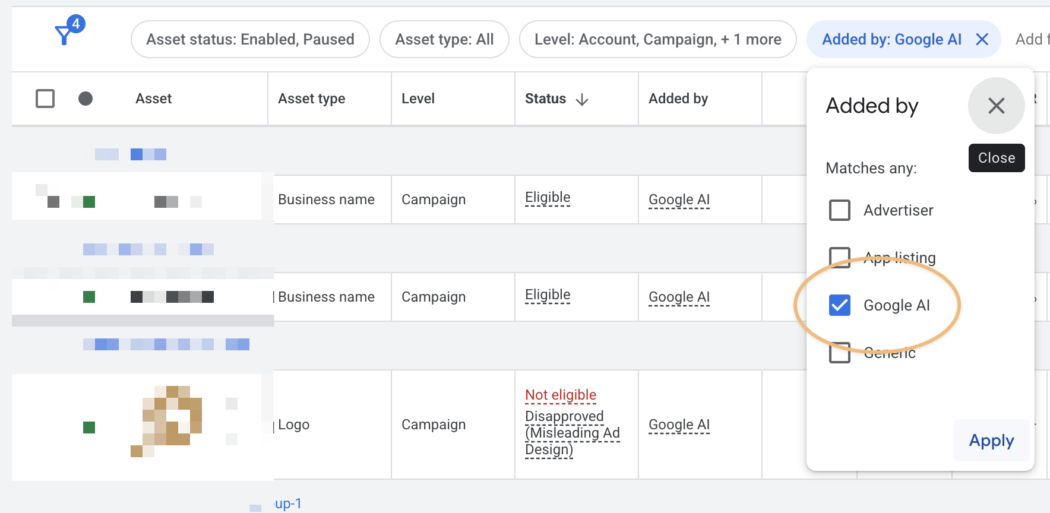
- Click on ‘Add a filter’ and search for ‘Added by’
- Tick the box next to ‘Google AI’ you may also see ‘Automatically created’
- Click Apply
- Review any assets that have been automatically created by Google Ads
How to Turn Off Account Level Automated Assets
Now that we’ve identified automated assets and paused them if they aren’t relevant or appreciated, you’ll want to stop Google from creating assets without your knowledge.
Here’s how you can turn off Google Ads automated in just a few clicks:
1. Log in to your Google Ads account
2. Navigate to Assets
3. Click on the 3 dots labeled More
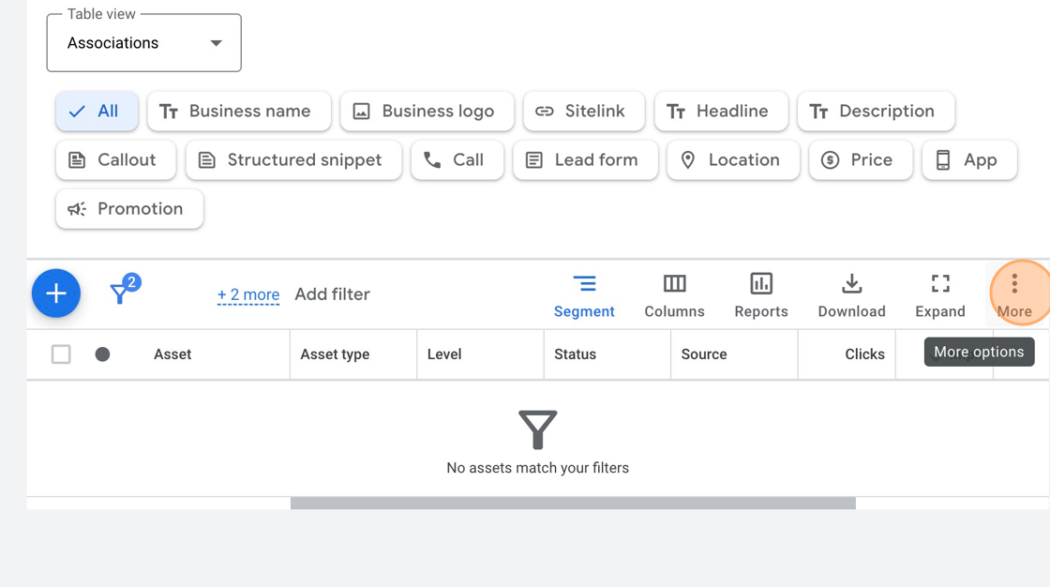
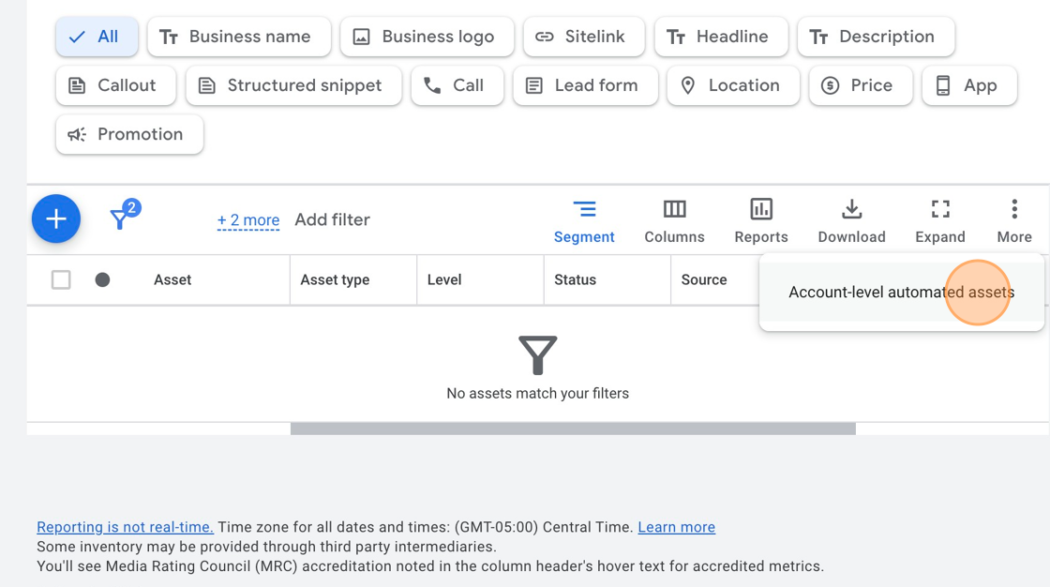
4. Click on Account-level automated assets
5. Click on Account-level automated assets settings
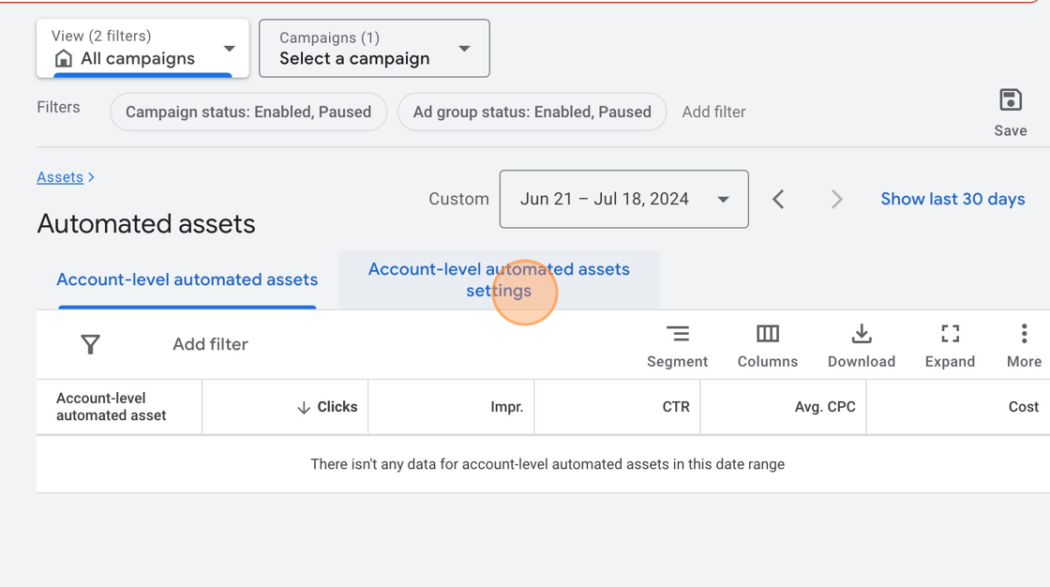
6. Tick all automated assets to OFF except for Seller Ratings and Automated locations
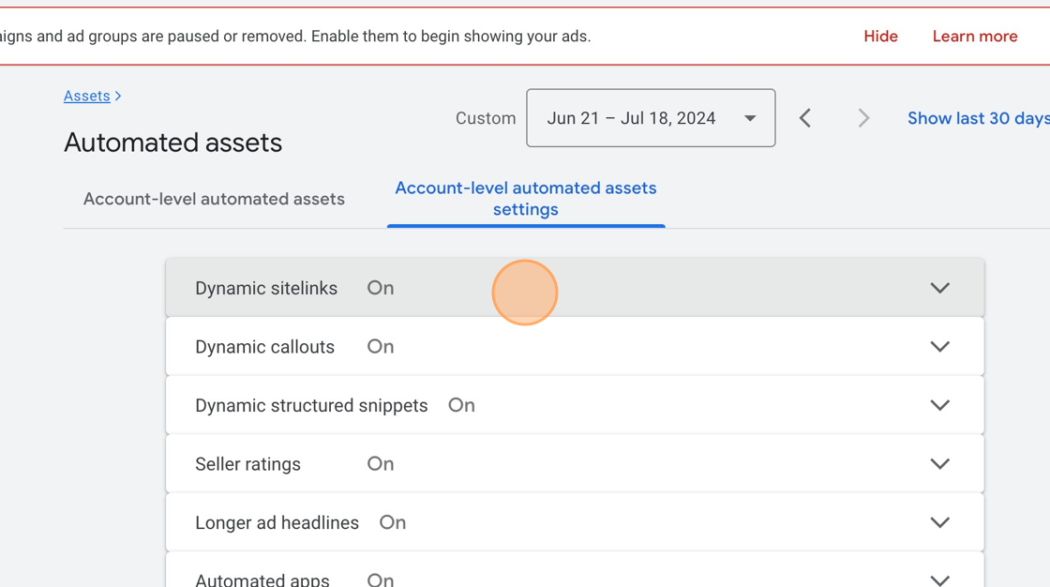
Once you’ve finished, your new settings will apply to your entire account, ensuring only the assets you or your ad manager create will be used.
Final Thoughts
Automated assets offer convenience and potential time savings, but they lack the personalized touch that will make your ads stand out. By understanding how to disable these automated features and taking control of your ad creation process, you can ensure your ads best represent your brand and connect more effectively with your audience.
Small business owners who take the time to review and optimize their ad assets will see better performance, higher engagement, and more efficient use of their ad spend because automated-AI-anything will never know your audience & business the way you do.